

Agents who respond to a new lead within one hour are 7x more likely to qualify them. Most agents respond in 24 hours or more. That gap is where deals disappear.
That reframes what real estate CRM software actually is. Not a software shopping decision. It’s follow-up infrastructure. And 72.5% of agents already have a CRM. The problem isn’t whether to get one. The problem is fit.
This guide breaks CRM evaluation into 7 dimensions: business-type fit, follow-up automation, integrations, pricing reality, AI capabilities, mobile experience, and data portability. Every CRM comparison article ranks the top platforms. This one gives you the framework to rank them yourself. CRM is the infrastructure for System 2 in the 7 business systems every agent needs — if you haven’t mapped your full stack yet, that’s the place to start.
Key Takeaways
- Use the 3-Tier CRM Framework to match your agent type (solo, team, brokerage) to the right feature set and price ceiling before comparing platforms.
- Test the automation builder during your free trial. If building one drip takes more than 2 hours, the platform is too complex for daily use.
- Calculate the total cost of ownership, not the sticker price. True CRM costs run 30-50% higher than the pricing page indicates.
- Request a test data export before signing any contract. If the vendor hesitates, that tells you everything you need to know about data portability.
- Never sign a CRM contract without testing the mobile app for a full week in the field.
What Real Estate CRM Software Actually Does (and What It Does Not)
Agents buy a CRM expecting lead generation. They get contact management. That mismatch kills more CRM adoptions than price, complexity, or bad software combined.
CRM covers the relationship from first contact through accepted offer. Contact records. Drip campaigns. Lead routing. Pipeline tracking. If a prospect fills out a form on Zillow, the CRM captures that contact, fires an automated response, assigns them to a drip sequence, and tracks where they sit in your pipeline. That’s the scope.
What CRM is not: transaction management. Platforms like Dotloop and SkySlope handle accepted offers through closings. Inspections, escrow coordination, compliance documents, eSignature workflows. These are critical tools, but they are not CRMs. Confusing the two creates misaligned expectations and wasted budget.
What CRM is not: lead generation. CRM manages leads once captured. It does not generate them. Platforms that bundle lead generation with CRM (BoomTown, Real Geeks) blur this line intentionally because “CRM + leads” sells better than “contact management.” Know what you’re buying.
Some CRMs include basic transaction management at the base price. Wise Agent and Top Producer both offer checklists and milestone tracking from contract to close. For agents closing fewer than 20 transactions per year, that overlap eliminates the need for a separate tool.
A quick diagnostic: if your biggest pain is losing leads or slow follow-up, you need real estate CRM software. If it’s missed deadlines or compliance gaps, you need transaction management. If it’s both, look for a platform with built-in transaction features or native Dotloop integration. 70% of real estate professionals use a CRM to manage sales funnels, meaning 30% use the wrong tool or no tool at all.
1. Business Type Fit: Solo Agent vs. Team vs. Brokerage
A solo agent paying $300/month for team features consumes 6% of a $50,000 annual commission before marketing or overhead. A team leader duct-taping spreadsheets to a solo-agent CRM that can’t route leads. A brokerage with 30 agents and zero visibility into follow-up. All three chose features before they chose a tier.
The 3-Tier CRM Framework
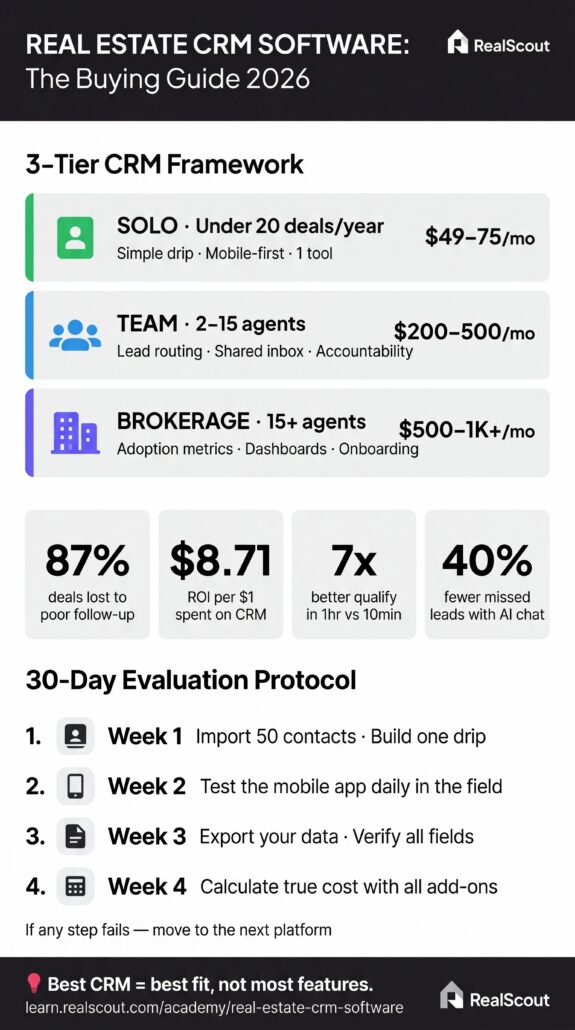
Solo agents (1 person, under 20 deals/year): You need simple contact management, a drip campaign builder, and a mobile app that doesn’t fight you. Price ceiling: $50- $75/month. Skip lead routing, team dashboards, and performance leaderboards. Wise Agent at $49/month includes transaction management at the base price, making it a realistic all-in-one for agents who don’t want to stitch together multiple tools.
Teams (2-15 agents): Lead routing and shared visibility are non-negotiable. The key question most team leaders skip: who owns the contact data? When an agent leaves, does the database stay with the team or leave with them? Resolve this in writing before you onboard a single agent. Follow Up Boss routes by territory, price point, and specialization, with shared inbox visibility across every team member. Budget $200-500/month.
Brokerages (15+ agents): At this scale, the challenge shifts from features to adoption. You need broker-level dashboards showing each agent’s response rates, conversion percentages, and pipeline velocity. Onboarding quality matters more than feature count, because 30 agents who actually use a simple CRM outperform 30 agents who ignore a powerful one. Budget $500-1,000+/month.
Best for / Skip if:
- Solo: Best for agents who want one tool under $75/month. Skip if you’re building a team within 12 months.
- Team: Best for groups needing lead routing and shared accountability. Skip if you have no system for deciding contact ownership.
- Brokerage: Best for firms prioritizing adoption metrics. Skip if you’re evaluating based on feature count alone.
2. Follow-Up Automation and Drip Campaign Depth
Only 12% of past clients return to their agent organically, despite 87-90% saying they’d rehire. That gap represents 75-78% of your past client base who liked working with you and will forget to call. CRM automates up to 80% of follow-up tasks. The question isn’t whether to automate. It’s what to automate first.
The 3 Automation Layers
Layer 1, Speed-to-lead: Waiting 10 minutes to reach a new lead drops conversion by 400%. Auto-responding within 1 hour improves qualification by 7x. Your CRM should fire an automated SMS within 5 minutes of a new lead entering the system. No exceptions. The first response needs to happen without you touching your phone. The message should qualify, not just acknowledge. “Are you looking to buy in the next 3-6 months, or just browsing?” beats “Thanks for your inquiry.” One starts a conversation. The other gets archived.
Layer 2, Nurture sequences: 8 touchpoints is the sweet spot for converting real estate leads. Multi-channel matters: the strongest sequences combine email, SMS, and behavior-triggered call reminders. A lead who has saved 3+ properties triggers an active buyer sequence. A lead going 30 days silent triggers re-engagement.
Layer 3, Past client re-engagement: Post-closing sequences, birthday and anniversary triggers, milestone check-ins. This layer recovers your dormant past-client database — the 88% who would rehire you but won’t remember to call. The fix isn’t complicated. It’s consistent.
The 30-Day Buyer Drip Structure
- Day 0: Instant SMS asking about timeline (3-6 months vs. browsing)
- Day 1: Personalized video email introduction
- Day 5: Market update for their target area
- Day 14: Off-market or coming-soon alert
- Day 30: Breakup email (“Should I remove you from my list?”)
That breakup email consistently generates responses from leads who had gone silent. It works because it removes pressure rather than adds it. Across campaigns, 17% of new leads become “Active” by responding to initial messages.
What to test during your trial: Set up one new-lead drip and one past-client check-in. If either takes over 2 hours, the builder is too complex for daily use. The automation builder is the feature you’ll use every day or the one that collects dust. No middle ground.
3. Lead Source Integrations and Ecosystem Fit
List your top 3 lead sources right now. That list instantly eliminates roughly 40% of CRM platforms, because if a CRM can’t natively receive leads from where your leads actually come from, the automation builder doesn’t matter.
The generic CRM trap: Salesforce, HubSpot, and Pipedrive can’t natively receive leads from Zillow, Trulia, Realtor.com, or IDX websites without using Zapier or a custom API. A generic CRM creates a manual data entry bottleneck that defeats the purpose of automation.
Integration depth varies enormously. Follow Up Boss connects to 250+ lead sources natively. Market Leader integrates with 40+. Top Producer connects to 320+ MLS boards. Before committing, verify your actual lead sources have native support.
The Integration Checklist
Before committing, verify native support for:
- Portal leads: Zillow, Realtor.com, Trulia
- Advertising leads: Facebook Lead Ads, Google Ads
- Organic leads: Your IDX website, open house sign-in apps (Curb Hero, Spacio)
- MLS integration: Direct feed from your local board (Top Producer covers 320+)
- Transaction tools: Dotloop, DocuSign, SkySlope
- Communication sync: Gmail or Outlook two-way sync, Google Calendar
The open house example: An agent uses Curb Hero as a digital sign-in app. Visitor contact info flows automatically into the CRM, triggers a thank-you text, and drops the contact into a post-open-house drip sequence. Zero manual entry.
If your CRM requires Zapier to connect to your primary lead source, it doesn’t fit your existing tech stack. Native integrations eliminate failure points and ensure leads arrive in real time, not with a 5-15 minute delay.
4. True Pricing: What CRMs Actually Cost Beyond the Subscription
Total cost of ownership for real estate CRM runs 30-50% higher than the subscription price on the website. Every platform publishes the base number. Almost none publish the full number. 22% of small firms cite cost as the top barrier to adoption, which makes accurate budgeting critical.
The 4-Layer Pricing Reality
Layer 1, Base subscription: Budget tier: $0-50/month (Wise Agent $49, HubSpot free). Mid-market: $50-200/month (Follow Up Boss Grow $69/user, LionDesk $69/user, Top Producer Pro $179/user). Team: $200-600/month (Follow Up Boss Pro $499 for 10 users, BoldTrail from $500). Enterprise: $600-1,000+/month (BoomTown from $750).
Layer 2, Per-user fees and add-ons: Email automation, advanced lead routing, and enhanced reporting are often gated behind upgrade tiers. Zillow integration and MLS data access each add $20-100/month. A $69/month base plan reaches $120-150/month once you enable the features you actually need.
Layer 3, Onboarding cost: Setup and training consume 10-20 hours, or $500-1,000 in opportunity cost for a solo agent. BoldTrail charges a $1,000 one-time setup fee in addition to its $500/month subscription.
Layer 4, Switching cost: If you choose wrong, 30-60 day cancellation notice, 1-2 weeks of data migration, rebuilding every automation from scratch, and 30 days running both systems in parallel. Total switching cost for a solo agent: 40-60 hours spread over 2-4 weeks. For a team of 10, multiply accordingly.
Pricing Benchmarks
- Solo agent: $49-75/month viable (Wise Agent $49 flat, Follow Up Boss Grow $69)
- Team of 10: $300-500/month (Follow Up Boss Pro $499 for 10 users)
- Brokerage 20+: $500-1,000+/month (BoldTrail $500+ with setup)
The ROI framing: CRM delivers $8.71 in value for every dollar spent, according to industry analyses. Real estate companies using CRM report a 41% increase in revenue per sales rep. One converted lead per month at $5,000-15,000 commission covers even the most expensive subscription. Divide the monthly cost by the average commission per deal. If one extra closed deal per quarter covers the annual cost, the math works.
5. AI Features That Actually Convert vs. Marketing Buzzwords
89% of successful agents will use AI-enhanced tools by 2026. But the gap between “AI-powered” marketing copy and actual AI functionality is costing agents real money.
AI Features with Documented ROI
Chatbot lead qualification: Teams using AI chatbots report a 40% reduction in unattended leads. The chatbot holds a qualifying conversation, asks about timeline and budget, and routes warm leads with context. Standard automation sends “Thanks for your inquiry.” AI asks “Are you pre-approved, and what’s your target move-in date?”
AI lead scoring: Behavioral analysis improves close rates by 30%. The system watches for hidden database signals — property saves, listing revisits, mortgage calculator clicks — then surfaces the 20% most likely to convert.
Predictive analytics: A Phoenix-based team that added an AI engagement layer to their existing CRM saw a 52% improvement in lead-to-tour rates and a 2.3x increase in weekend conversions. That’s not a marginal improvement. That’s a different business.
AI Features That Are Rebranded Automation
- “Smart” lead routing is a rule-based assignment (if ZIP code = X, assign to Agent Y). Logic, not intelligence.
- “AI drip campaigns” are pre-written sequences with merge fields. Mail merge, not machine learning.
- “AI insights” are basic reporting dashboards.
The evaluation test: Ask the vendor: “Does your AI learn from my data over time, or follow pre-set rules?” Rules = automation, not AI.
That said, some platforms are integrating genuinely adaptive AI into the CRM experience. RealScout, for example, uses AI to match client preferences with listings in real time, an approach that goes beyond rule-based automation into behavioral pattern recognition. It’s one example of the direction the category is heading.
Best for: Teams with 20+ leads/month where after-hours response is a gap. Skip if: Solo agent with fewer than 10 new leads/month.
6. Mobile App Quality and Field Usability
One agent documented a 38% drop in lead response speed after switching to a CRM with a poor mobile interface, paying $200+/month for desktop features they could only use at their desk.
Agents work in the field. 78% of leads are lost due to slow response times. If your CRM’s mobile app can’t execute the five actions that matter, the desktop version is irrelevant.
The Mobile Evaluation Checklist
- Speed test: Can you respond to a new lead in under 60 seconds from push notification?
- One-tap calling: Does tapping a number auto-log the call?
- Contact loading: Do records load instantly, or do you stare at a spinner?
- Sync behavior: Real-time sync, or batch updates every 15-30 minutes?
- Drip control: Can you view and override a contact’s drip campaign from mobile? If a lead tells you at an open house they’re ready to buy this week, you need to pull them out of a 90-day nurture sequence on the spot.
App store ratings as a signal: Ratings below 4.0 from hundreds of reviews indicate systemic mobile issues that updates haven’t fixed.
53% of buyers expect a response within one hour. A platform with a beautiful desktop and a frustrating mobile app is built for demos, not for agents between showings.
Never sign a CRM contract without testing the mobile app for a full week in the field.
7. Data Portability and Switching Costs
“Can I leave?” is the question agents never ask before signing. It’s also the question that determines how much negotiating power you have 12 months from now.
Data ownership varies by account type. Solo agent accounts give you full CSV export at any time. Team or brokerage CRMs typically assign ownership to the team lead or brokerage. Agents who leave may lose their entire contact history. A Keller Williams agent using KWCommand gets CRM included with membership, but if they leave KW, that database may stay behind.
Before signing, ask: “Who owns the contact data?” and “Can I export a full CSV with all fields at any time?”
The CRM Migration Framework
Step 1 – Audit and clean: Tag every contact by status. Remove duplicates. This 3-5-hour investment saves days on import.
Step 2 – Export as CSV: Verify that ALL fields export, not just name, email, and phone. Some platforms strip tags, custom fields, and communication history. Request a test export before you need it.
Step 3 – Map fields to the new CRM: Test-import 50 contacts first. Check that tags, statuses, and custom fields transferred accurately before running the full import.
Step 4 – Rebuild automations from scratch: Drip campaigns, routing rules, and action plans do not transfer between CRMs. Allocate 1-2 weeks to recreate workflows.
Step 5 – Run both systems in parallel for 30 days: New leads go into the new CRM. Active leads stay in the old system until sequences are complete.
Total migration: 2-4 weeks of part-time work.
Contract Traps
- Annual contracts with early termination fees (often 50-100% of remaining value)
- 30-60 day cancellation notice requirements
- Data deletion 30-90 days after account closure
Before signing any CRM contract, request a test export. If the vendor hesitates or the export is incomplete, that tells you everything.
The CRM Decision Framework: Match Your Business to Your Platform
Seven criteria. Three agent types. One prioritization guide. If any step in the 30-day protocol below fails, move to the next platform.
Solo agents closing fewer than 20 deals per year: Prioritize pricing (criterion 4) and automation (criterion 2). Flat-rate under $75/month with built-in drip and transaction management. Test the mobile hard. Skip lead routing and team dashboards.
Growing teams of 2-15 agents: Prioritize business type fit (criterion 1) and integrations (criterion 3). Lead routing and shared visibility are non-negotiable. Verify native connection to the top 3 lead sources. Budget $300-500/month.
Brokerages with 15+ agents: Prioritize data portability (criterion 7) and AI (criterion 5). At scale, adoption is the challenge. Choose the best onboarding and mobile, not the most features. Budget $500-1,000+/month.
The 30-Day Evaluation Protocol
- Week 1: Import 50 contacts and set up one drip campaign.
- Week 2: Test the mobile app daily in the field.
- Week 3: Try exporting your data. Verify all fields come through.
- Week 4: Calculate true monthly cost with all add-ons included.
As the AgentAdvice editorial team puts it: “The best real estate CRM is not the one with the most features. It’s the one that matches an agent’s goals, technological comfort level, client base, and time commitment.”
Frequently Asked Questions About Real Estate CRM Software
Do I really need a CRM as a solo real estate agent?
Once you’re managing more than 50 active contacts, yes. 66% of NAR respondents found CRM meaningful. Below 50, a spreadsheet works. Above that, the manual follow-up breaks down. A $49/month CRM pays for itself with one extra conversion per quarter.
What is the difference between a CRM and transaction management software?
CRM manages the first contact through the accepted offer: contact records, drip campaigns, and lead routing. Transaction management handles accepted offer through closing: documents, deadlines, escrow, and compliance. Dotloop and SkySlope are transaction tools. Follow Up Boss and Wise Agent are CRMs. Some platforms include both.
How much does a real estate CRM cost in 2026?
Budget tier: $0-$50/month. Mid-market: $50-$200/month. Team: $200-$600/month. Enterprise: $600-$1,000+. Add 30-50% to the sticker price for the true cost, including add-ons, per-user fees, and onboarding time. Solo agents should target $49-$75/month all-in.
Can I take my contacts with me if I switch CRMs?
Solo accounts allow full CSV export. Team or brokerage accounts often assign ownership to the team lead or broker. Agents leaving may lose contact history. Ask “Who owns the data?” and “Can I export all fields?” before signing.
What is speed-to-lead, and why does it matter?
The time between a lead submitting info and your first response. Waiting 10 minutes drops conversion by 400%. Responding within 1 hour improves qualification by 7x. CRM fires an instant SMS without you touching your phone.
Are AI CRM features worth the extra cost?
For teams with 20+ leads per month, yes. AI chatbots reduce unattended leads by 40%, and lead scoring improves close rates by 30%. A Phoenix team saw 52% improvement in lead-to-tour rates. For solo agents with under 10 leads per month, basic automation covers you.